ライブイベント向けLEDビデオスクリーン:完全ガイド
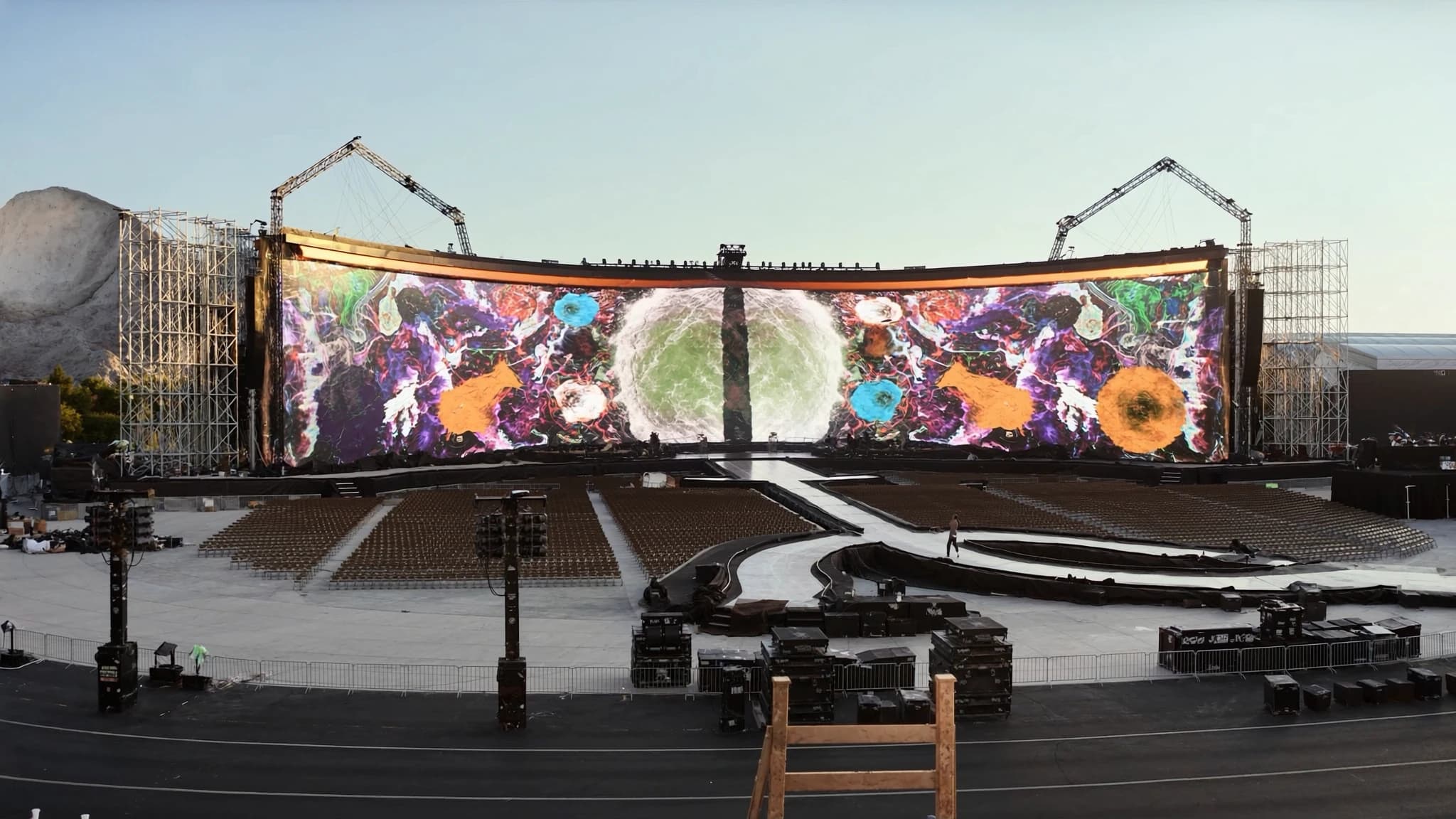
LEDビデオウォールは、現代のライブイベントプロダクションの backbone となり、企業会議から大規模な屋外フェスティバルまで、比類のない輝度、コントラスト、拡張性を提供しています。フルAVLプロダクションパートナーとして、SSOUNDSは世界クラスのオーディオと高度なLEDビデオソリューションを統合し、シームレスな同期とプロフェッショナルグレードの結果を保証します。このガイドでは、次のショーや設置に最適なLEDウォールを仕様化するのに役立つ、必須の技術仕様、パネル、ピクセルピッチ、輝度、処理、リギング、コンテンツについて説明します。
主なポイント
- LEDビデオウォールはモジュール式で拡張可能であり、最適な視聴距離のために異なるピクセルピッチを持つ屋内/屋外バリアントがあります。
- ピクセルピッチ(mm)はほぼ最小視聴距離(メートル)に等しい。近距離にはP1.9~P2.5、中距離にはP3.9~P6、長距離にはP8+を選択してください。
- 屋内輝度:500~1,500ニット、屋外:5,000~10,000+ニット、エネルギー効率のための自動輝度センサー付き。
- ビデオプロセッサはスケーリング、色校正、マルチソーススイッチングを処理します。NovaStarやBromptonのような信頼できるブランドに投資してください。
- リギングは重量、風荷重、安全性を考慮する必要があります。電力計算には冗長性と適切な接地を含める必要があります。
- コンテンツはネイティブ解像度で作成し、テキスト用のセーフゾーンを設け、リアルタイム制御のためにプロフェッショナルメディアサーバーを介して再生する必要があります。
LEDパネルとキャビネット:構成要素
LEDビデオウォールは、タイル状に組み合わせてシームレスなディスプレイを形成するモジュール式パネル(キャビネット)から構築されます。各キャビネットには、PCBにはんだ付けされた発光ダイオード(LED)のアレイ、電源、データレシーバー、取り付けハードウェアが含まれています。標準的なキャビネットサイズは500×500 mmから500×1000 mmで、奥行きは屋内用または屋外用の定格によって異なります。
屋内キャビネットは通常、より軽く薄く(多くの場合10 kg未満)、パッシブ冷却を備えていますが、屋外キャビネットはより重く、耐候性(IP65以上)で、直射日光や雨に対処するためのアクティブファン冷却を備えています。レンタルおよびステージングアプリケーションでは、クイックロック機構(例:クイックリリースレバーやカムロック)により、工具なしで迅速な組み立てと分解が可能です。
キャビネットを選択する際は、ピクセルピッチ(次に説明)、視野角(通常水平/垂直140°~160°)、リフレッシュレート(カメラキャプチャのフリッカーなしには≥1920 Hz)を考慮してください。SSOUNDSは、ミッションクリティカルなイベントには冗長電源およびデータ入力を備えたキャビネットを推奨します。
ピクセルピッチと視聴距離
ピクセルピッチは、隣接するLEDの中心間のミリメートル単位の距離です。これはディスプレイの解像度と最適な視聴距離を決定します。小さいピクセルピッチ(例:1.2 mm)はより高い解像度をもたらし、視聴者が個々のピクセルを見ることなく近くに立つことを可能にしますが、大きいピッチ(例:10 mm)は長距離視聴に適しています。
一般的なルール:最小視聴距離(メートル)≈ ピクセルピッチ(mm)。例えば、P2.5ウォールは2.5 m離れた場所から視聴できます。最前列の観客にはP1.9~P2.5、中距離にはP3.9~P6、極端な距離(例:スタジアム)にはP8~P16を選択してください。スクリーンドア効果を避けるために、常に最も近い視聴者距離を考慮してください。
SSOUNDSのエンジニアは、AI支援シミュレーションツールを使用して、会場レイアウトに最適なピクセルピッチを計算し、予算、解像度、視認性のバランスを取ります。多目的スペースでは、P3.9ウォールが一般的なイベント距離に対してコストと明瞭さの間の良い妥協点を提供します。
屋内対屋外の輝度(ニット)
輝度はニット(平方メートルあたりのカンデラ)で測定されます。屋内LEDウォールは通常500~1,500ニットが必要で、周囲光が制御されています。屋外ウォールは直射日光を克服する必要があり、5,000~10,000ニット以上が必要です。ただし、輝度が高いと消費電力と熱が増加するため、屋外ウォールには周囲光に基づいて調整する自動輝度センサーがしばしば備わっています。
ステージ照明のある屋内イベントでは、最前列を眩ませずにコントラストを維持するために1,000~1,500ニットを目指してください。屋外日中のイベントには少なくとも5,000ニットが必要です。夜間使用には2,000~3,000ニットで十分です。常にLEDの黒レベルとコントラスト比を確認してください。高コントラストパネル(例:5000:1)は中程度の輝度でもより良く見えます。
SSOUNDSは、キャリブレーションされた輝度曲線を備えた屋内および屋外LEDパネルの範囲を提供し、ウォール全体で一貫した色と輝度を保証します。当社のシステムには、屋外設置での自動輝度調整用の環境センサーが含まれています。
プロセッサとスケーラー:ウォールの頭脳
LEDウォールには、入力信号(HDMI、SDI、DisplayPortなど)を受信し、パネルのネイティブ解像度にマッピングするビデオプロセッサ(スケーラー)が必要です。プロセッサは、スケーリング、色校正、フレーム同期、マルチレイヤーコンポジットを処理します。大規模なウォールでは、複数のプロセッサをデイジーチェーン接続するか、冗長構成で使用することがあります。
探すべき主な機能:4K/8K入力のサポート、HDR(HDR10、HLG)、低遅延(IMAGを使用するライブイベントに重要)、マルチスクリーン同期用のgenlock、EDID管理。プロセッサはまた、単一ソースを複数のウォールセクションに分割したり、プロジェクションとブレンドしたりする「キャンバス」マッピングを可能にします。
SSOUNDSは、主要なプロセッサ(例:NovaStar、Brompton)を当社のAVLエコシステムに統合し、単一ネットワークを介したシームレスな制御のために事前設定しています。当社のエンジニアは、重要なショー中のダウンタイムをゼロにするために冗長処理パスを設計できます。
リギングと電源:構造および電気的考慮事項
LEDウォールのリギングには、キャビネットを支持構造(トラス、グラウンドサポート、または壁面マウント)に取り付けることが含まれます。各キャビネットには重量と風荷重定格があり、屋外ウォールは風力に耐える必要があります。認定されたリギングハードウェア(シャックル、クランプ、モーター)を使用し、メーカーの負荷制限に従ってください。吊り下げウォールの場合、総重量を計算し、トラスまたはルーフがそれを支えられることを確認してください。
電力要件:LEDウォールはかなりの電力を消費します。典型的なP3.9屋内キャビネットは200~400 Wを消費する可能性があり、屋外キャビネットは600 Wを超えることがあります。総電力を計算し、適切な接地を備えた専用回路を提供してください。サージ保護と遠隔監視を備えた電源分配ユニット(PDU)を使用してください。SSOUNDSは、重要なイベントには冗長電源フィードを推奨します。
データケーブル:キャビネットとプロセッサ間の信号伝送には、シールド付きCat6または光ファイバーを使用してください。大規模なウォールでは、長距離での信号劣化を避けるために光ファイバーが好まれます。オーディオラインとの干渉を避けるためにケーブルパスを計画してください。
コンテンツ制作と再生
LEDウォール用のコンテンツは、スケーリングアーティファクトを避けるために、ウォールのネイティブ解像度(またはその倍数)で作成する必要があります。再生にはメディアサーバー(例:Resolume、Watchout、Disguise)を使用し、リアルタイムコンポジット、マッピング、照明とオーディオとの同期をサポートします。IMAG(画像拡大)の場合、カメラフィードが適切にフレーミングされ、色が一致していることを確認してください。
アスペクト比を考慮してください。ほとんどのウォールはカスタムサイズで構築されるため、コンテンツはキャンバスに合わせて設計する必要があります。テキストとロゴにはセーフゾーンを使用してください。インパクトのあるビジュアルには、ウォールの高い輝度とコントラストを活用し、パネルの継ぎ目を露呈する可能性のある暗すぎるコンテンツは避けてください。
SSOUNDSは、コンテンツコンサルタントと再生ハードウェア統合を提供し、メディアが当社のLEDシステム上で完璧に動作することを保証します。また、複数のウォール間で一貫した外観のための事前校正されたカラープロファイルも提供できます。
ショーまたは設置のためにLEDウォールを仕様化する方法
イベントタイプ、会場寸法、観客レイアウトを定義することから始めます。ピクセルピッチを選択するために主要な視聴距離を決定します。ステージデザインまたは建築上の制約に基づいて必要なウォールサイズ(幅×高さ)を計算します。レンタルの場合、モジュール性を考慮し、柔軟な構成を可能にする標準キャビネットサイズを使用します。
次に、場所と周囲光に基づいて屋内用または屋外用パネルを選択します。輝度(ニット)とコントラスト比を指定します。処理要件を決定します:入力数、解像度、バックアップの必要性。リギングについては、ウォールを吊るす場合は構造エンジニアに相談してください。最後に、コンテンツ制作、ケーブル、オンサイト技術サポートの予算を計上します。
SSOUNDSはエンドツーエンドのAVLソリューションを提供します。完璧なLEDウォールの仕様化、当社のプレミアムPAシステムとの統合、オンサイトエンジニアリングを支援します。当社のAI支援設計ツールは、特定の会場に合わせてカバレッジ、輝度、ピクセルピッチを最適化し、オーディオを補完する素晴らしいビジュアル体験を保証します。
よくある質問
屋内用と屋外用のLEDパネルの違いは何ですか?
屋内パネルは軽量で、輝度が低く(500~1,500ニット)、耐候性はありません。屋外パネルは重く、明るく(5,000~10,000+ニット)、雨、埃、UVに対するIP65+の保護性能を備えています。また、熱を管理するためにアクティブ冷却を使用します。
LEDウォールに必要な総電力を計算するにはどうすればよいですか?
キャビネット数に、キャビネットあたりの最大消費電力(データシートを確認)を掛けます。ピーク用に20%の余裕を追加します。例えば、50キャビネット×300 W = 15,000 W、余裕を含めると18,000 Wです。専用回路とサージ保護付きPDUを使用してください。
直射日光の下で屋外でLEDウォールを使用できますか?
はい、ただし少なくとも5,000ニットの輝度(強い日光下では7,000+が望ましい)を持つ屋外対応パネルが必要です。また、パネルが高いコントラスト比と反射防止コーティングを備えていることを確認してください。自動輝度センサーは視認性の最適化に役立ちます。
最前列が3メートルの企業イベントでは、どのピクセルピッチを選ぶべきですか?
視聴距離3 mの場合、ピクセルピッチP2.5~P3.9が適しています。P2.5はよりシャープに見えますが、コストが高くなります。P3.9はバランスが良いです。予算が許せば、プレミアムな鮮明さのためにP2.5を選んでください。
SSOUNDSはLEDビデオとオーディオシステムをどのように統合しますか?
SSOUNDSは、LEDビデオプロセッサとオーディオDSPが共通ネットワーク(例:Dante、AVB)を介して同期される統合AVLエコシステムを提供します。当社のエンジニアは、リップシンク、調整されたショーコントロール、トラブルシューティングのための単一ベンダーサポートを確保するために、システム全体を設計します。
システムの構築やアップグレードをお考えですか?
SSOUNDSは、単一の部屋からスタジアム規模まで、プロ用PAを世界中で設計・製造しています。